Anyone who has dabbled in JavaScript might have heard of the event loop. Event loop is one of those magical and mystical things in JavaScript that is often misunderstood. In this post, I am actually going to cover what an event loop is. I will cover the intricacies of the JavaScript event loop in another post.
Let’s take a trip down the memory lane and see why we need this “event loop” to begin with.
History of Computer Programs
As you are probably aware, computers have been around for a long time. As long as computers have been around, people have been writing programs for it.
Initially, electronic computers were designed as fast number crunchers. They had no graphical interface – buttons, menus, etc. For kids reading this today, there was no touch screen that you can use to draw over your photos for your Instagram story. There was not even a screen for you to poke around.
The way these old computers would work is – you start the computer, plug in your punchcard with your code on it and have the computer try to run your code only to realize that you had accidentally flipped a bit in your punchcard and you a punch a hole in the wall in frustration. That’s how it worked.
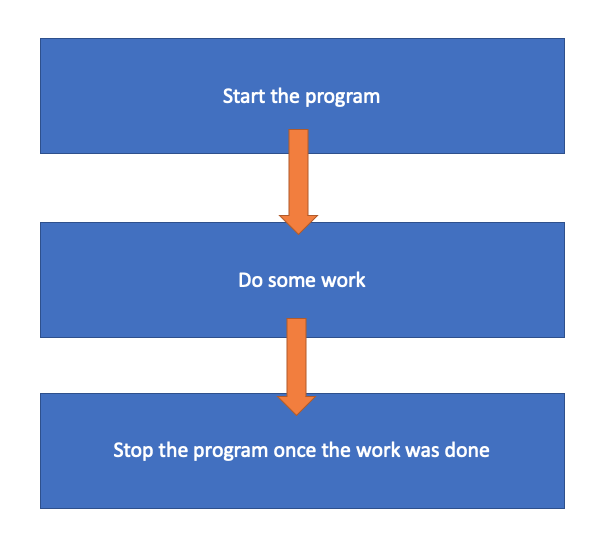
So, the flow of control in these old computer programs was more or less the following
Rise of the GUI
In 1973, a bunch of people at Xerox PARC developed the Alto computer. It was one of the first computers to have a screen that displayed a graphical interface that resembled a user’s actual desk (That’s where the word Desktop comes from). The alto went on to inspire so many products and companies that are still around even today – Apple, Microsoft, Sun Microsystems, etc.
Here is one of the earliest GUIs from Alto

But graphical user interfaces presented a challenge for the existing control flow of programs. Most program that existed at that time used the number crunching control flow we have seen before
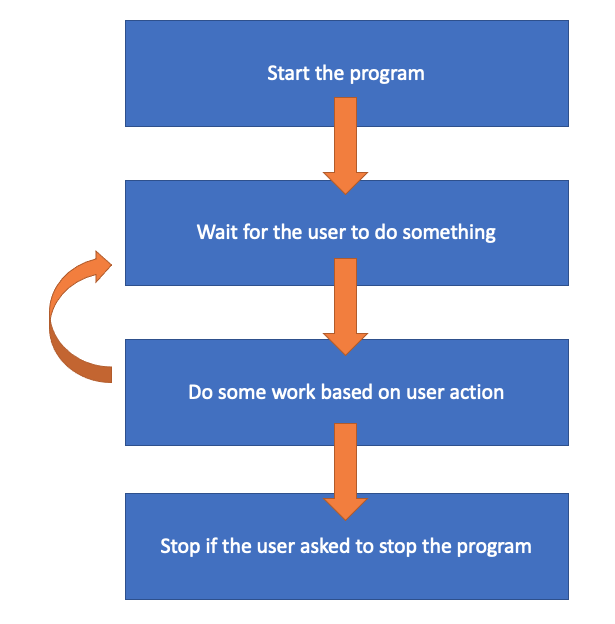
But this flow doesn’t work very well for Graphical User Interfaces (GUIs). GUIs have to wait for the user to perform an action like clicking a button before it can do something and it has to go back to keep waiting until the user does another action. But the existing control flow didn’t support it. Also, we cannot just stop the program if the user didn’t perform any action. So, the control flow had to change to something like this to support the rise of GUIs
I/O Operations
As it turns out, GUIs were not the only ones that were breaking the traditional control flow model. In the early days of computing, storage was very clunky and slow. So, it look a long time to read data from storage devices and programmers who were developing programs that talked to storage devices to had to contend with a similar problem. They had to wait until data was read from storage before attempting to process it. So, they came up with a control flow that is very similar to what GUI developers had come up with

A similar flow is in use even today if you peek under the covers of any programs that deals with storage as reading from storage is not instantaneous.
As the era of the networked computers started, the developers dealing with network hardware also faced similar problems with reading or sending data from and through the network. So, they came up with a flow that is very similar to the GUI flow

If you paid close attention to all the three flows that I showed, you would have noticed that they all share something similar
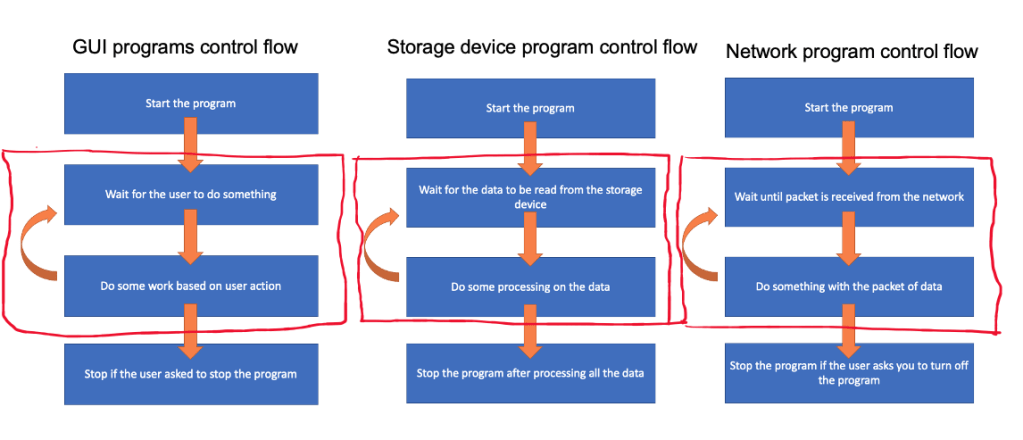
All the three flows have these three properties in common
- Waiting for some event to happen
- In the case of GUIs – The flow is waiting for user to do something
- In the case of the storage program – The flow is waiting for the data to be read from storage
- In the case of the network program – The flow is waiting for the full packet of data from the network
- Once an event happens, they perform some work based on that event
- In the case of GUIs – The flow reacts to the user action
- In the case of the storage program – The flow processes the data read from storage
- In the case of the network program – The flow processes the packet of data received from the network
- Go back (or loop back) to waiting for the next event to happen
I have given the words “event” and “loop” a different color. Can you guess why?
All these three programs have what we refer to as an “event loop”. Let’s actually define what an event loop is then.
Event Loop
An event loop is a software design pattern where a program has the ability to wait for events and once an event was delivered to the program, it can handle the event and once it finishes handling the event, it goes back to waiting for more events.
Examples of Event Loops
Believe it or not, event loops far predate JavaScript.
- Event loops became an essential part of GUI development back in the 1970s.
- If you ever developed a Win32 GUI, you would have come across the event loop as every
WinMainfunction is required to have one. - Apple has a version of it in its Cocoa framework called the NSRunLoop.
- Ruby has a library called EventMachine which implements an event loop.
- Python has a library called Twisted which implements an event loop.
- Obviously JavaScript has an event loop.
- There are also event loop libraries available for C/C++ in the form LibEV, LibEvent and LibUV.
There is probably an event loop library for every programming language out there. So what I am telling you is that event loops are very old tech. But just like your trusty grandma, it is a reliable and trusty tech. We have spent literally decades making it perfect.
But it still doesn’t answer the question “Why on earth does JavaScript need an event loop?”
Why on earth does JavaScript need an event loop?
If you go back to the history of why JavaScript was created, it was to allow for adding bits of interactivity to what was mostly a web filled with static content back then. So, the design goal for JavaScript was to actually develop small bits of GUIs with it.
Let’s actually unpack this a little bit more with a simple example.
Let’s say that you have a static web page. You want to allow the user who is coming to your page to change the font used to display the website. So, you add a button that says “Change to awesome font”. Here is how JavaScript uses the the event loop to make this possible
- JavaScript engine starts an event loop as soon as the page is loaded. But it is just waiting.
- JavaScript allows you to raise events when something happens. For example, clicking a button raises an event that says “Hey. Someone clicked me”. There are literally thousands of events that can be raised. You can find a list at https://www.w3schools.com/js/js_events.asp
- These events are sent to the event loop where it is eagerly awaiting some event to arrive.
- JavaScript also allows you to register handlers with the event loop that can handle certain events. Let’s say that we register an event handler that handles button clicks and changes the font used in the page.
- When the event arrives at the event loop, it checks if there is some handler that can handle the event. If there is a handler, it invokes the handler and passes the event to it. So, our wonderful event handler gets invoked and we run some code that changes the font used in the page and goes back to waiting again for new events. If there was no handler, it ignores the event and goes back to waiting again.
Hope you enjoyed this post. If you have any questions/comments, please let me know in the comments section.
 Adhithya Rajasekaran
Leave a comment